The 13-inch MacBook Air M5 is the laptop to buy, if you can forgive its screen.
Buy the 13-inch MacBook Air M5 for serious everyday work in the lightest practical package, but skip it if a modern high-refresh display, sustained heavy performance or generous ports matters more than portability.
Based on published owner reports, 1 owner discussion and 9 other sources. We have not tested this machine ourselves.
We earn a commission if you buy through our links, which does not affect what we say.
Read how this site works →
The final call
The 13-inch MacBook Air M5 is one of the best mobile work computers available for people who value silence, battery life and low weight more than spectacle. It is fast enough to disappear behind the work, refined enough to make long days pleasant and compact enough to travel without becoming a separate logistical problem.
Apple’s neglected display keeps it from being the obvious premium-laptop winner. The panel is accurate and perfectly usable, but buyers should not have to explain away 60Hz SDR at this tier. The sparse port layout, permanent memory and storage, and fanless throttling are equally real, even if each affects a narrower audience.
Buy the base 16GB/512GB model when you need more than browser-level computing and expect to keep the machine for several years. Consider 24GB when heavy creative applications, development environments or local AI are already part of the workload. Pick the 15-inch Air when workspace matters more than the lightest bag, and move to a Pro when long sustained jobs, superior display quality or built-in professional ports are requirements rather than wishes.
M3 and M4 owners should usually keep what they have. M1, M2 and Intel owners will see a more meaningful change, but even then the right upgrade date is the day the current machine obstructs the work. For a broader field of options, see the site’s best MacBooks guide or its recommendations for the best MacBook for students.
Best for: Macbook for students
The MacBook Air’s best quality is not the M5 chip, Apple Intelligence or any one number on a specification sheet. It is the way a fast processor, silent chassis, excellent trackpad, long battery life and genuinely portable body stop calling attention to themselves. This is a laptop that can handle demanding ordinary work without feeling like demanding hardware.
That makes the 13-inch Air unusually easy to recommend to writers, students, researchers, developers, travelling professionals and anyone whose working day is built from documents, browsers, calls, code and intermittent creative jobs. Its 16GB of unified memory and 512GB SSD also establish a much healthier starting point than the cramped base configurations Apple sold in earlier years.
The catch is visible every time the lid opens. The 13.6-inch Liquid Retina panel is sharp, colour-accurate and bright enough for normal indoor work, yet it remains a 60Hz SDR IPS display without HDR, OLED, mini-LED or variable refresh. Apple has paired a thoroughly current computer with screen technology that now looks conservative beside cheaper OLED and high-refresh rivals.
You want one compact Mac for years of mobile work, real multitasking and occasional creative workloads.
You need long renders, serious AAA gaming, later upgrades, built-in HDMI or SD, or a screen that feels premium in 2026.
Configuration matters before any benchmark does. The Amazon model covered here is the Sky Blue 13-inch machine with 16GB of memory and a 512GB SSD. It is the base configuration, ordinarily paired with an 8-core GPU. Several widely circulated reviews instead tested 1TB machines with 10 GPU cores, so their graphics, storage and export results should not be treated as exact measurements of this listing.
Key Specifications
The old design still understands the assignment
The Air’s aluminium body has barely changed since the M2 generation, which makes the M5 look uneventful beside laptops chasing folding screens, touch displays and increasingly elaborate hinges. It also remains an exceptionally coherent piece of hardware. At 11.97 by 8.46 inches, 0.44 inches thick and 2.7 pounds, it is small enough to carry daily without negotiating with your shoulder.
That last point is the 13-inch model’s reason to exist. The 15-inch MacBook Air offers more room for spreadsheets, timelines and side-by-side windows, along with a larger trackpad and stronger six-speaker system. The 13-inch version is easier to use on a train, in a lecture hall or on the narrow table that passes for a desk in many hotel rooms. Owners who moved down from a 15-inch machine repeatedly found the smaller workspace less restrictive than they had feared.
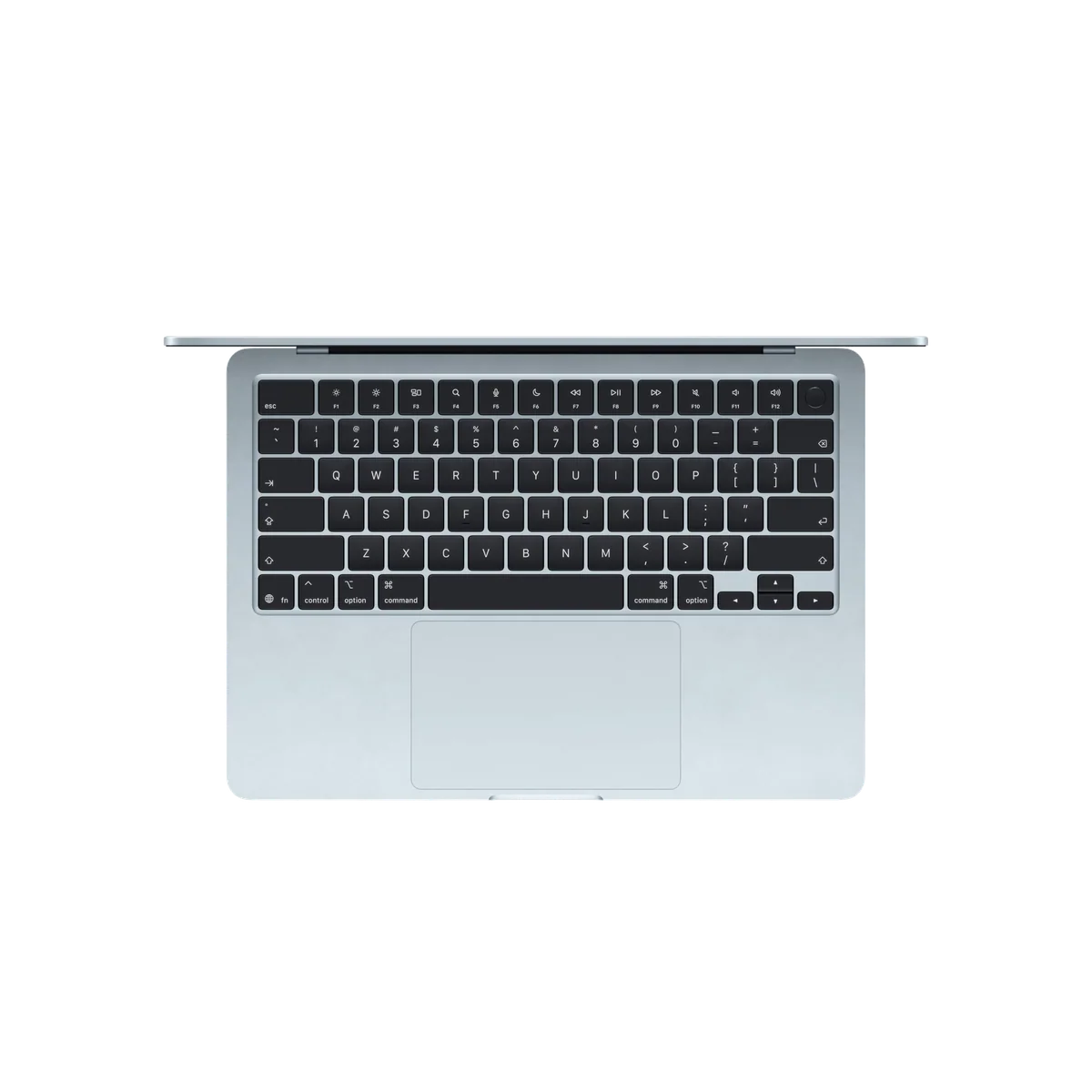
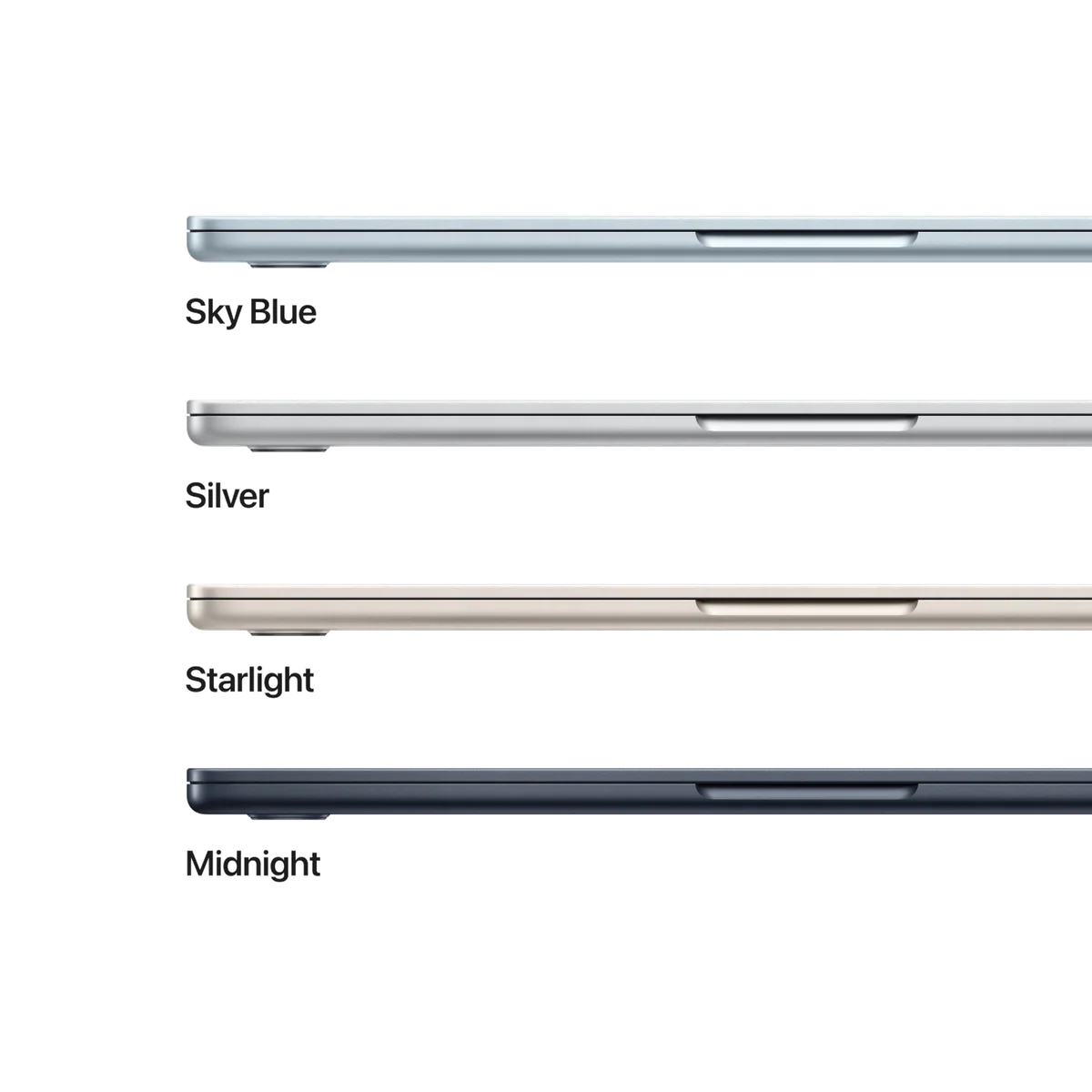
Sky Blue is restrained rather than electric. It can look close to silver when viewed straight on, with the blue becoming clearer as the light shifts. That subtlety will disappoint anyone hoping for the more playful colour treatment of Apple’s entry-level MacBook, but it suits an office and shows fewer fingerprints than the darker Midnight finish.
A good display that is no longer a good deal
Text looks crisp at 2560 by 1664, P3 colour is useful for visual work, and the rated 500-nit brightness is credible rather than decorative. Independent measurements ranged from just under the claim to slightly above it. True Tone makes long reading sessions more comfortable, and the panel looks attractive when judged on its own.
Judged against the market, it is the machine’s clearest weakness. Scrolling never has the immediacy of a 90Hz or 120Hz screen, black levels cannot match OLED or mini-LED, and HDR material receives no proper HDR treatment. Some work-focused owners are unbothered by 60Hz, especially because a laptop is not manipulated directly by touch, but buyers accustomed to ProMotion will notice the downgrade immediately. Our guide to whether a 60Hz display is good enough explains why workload and prior devices matter more than the specification in isolation.
The camera notch remains inelegant. It usually occupies menu-bar space rather than covering working content, and movies often hide it inside letterboxing, but calling it harmless does not make it beautiful.
Inputs that make eight-hour days easier
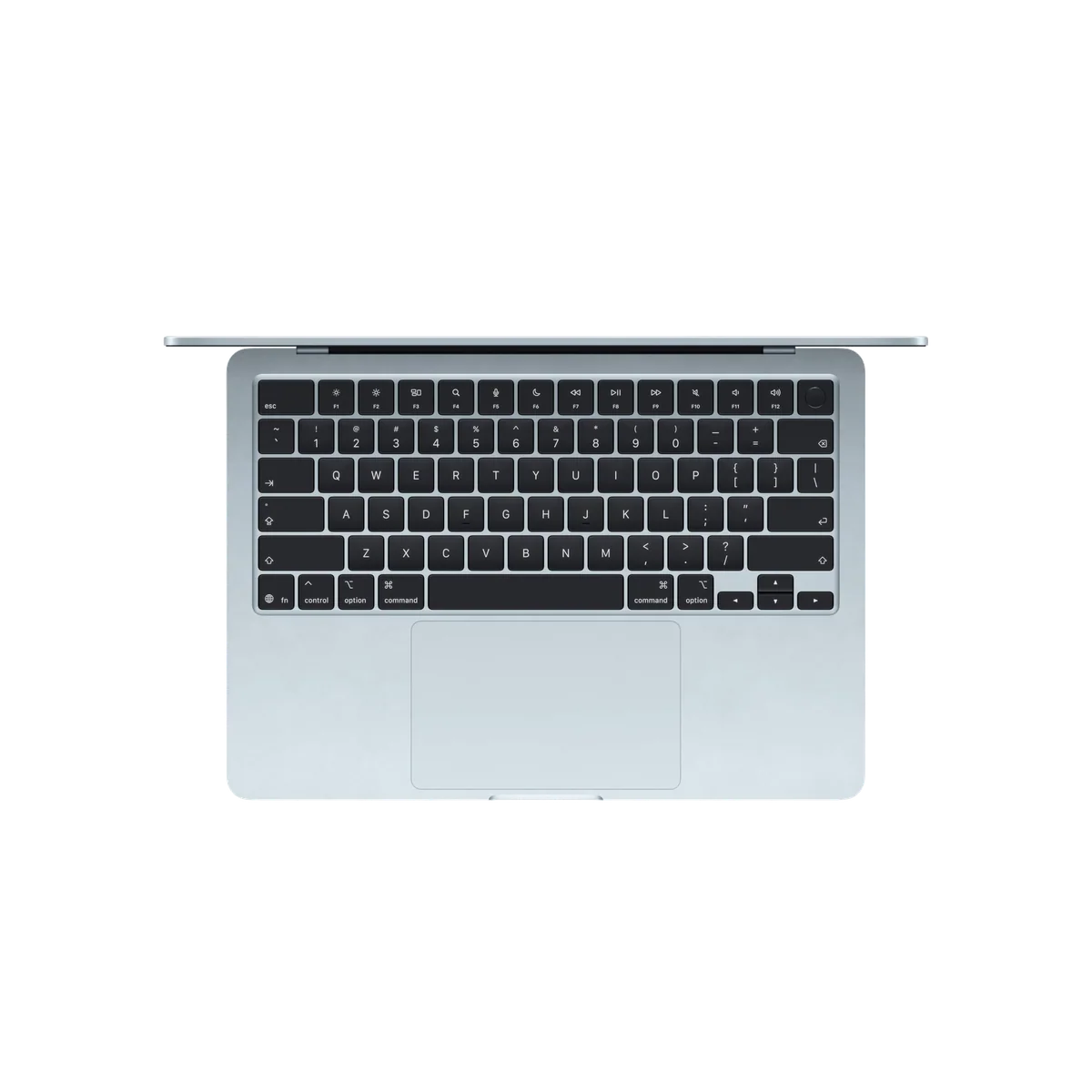
Apple’s keyboard is quiet, accurate and comfortable for most typists, although its shallow travel lets heavy fingers reach the deck quickly. The revised US keycaps use symbols in places where older keyboards used words, a visual change rather than a functional one. Keyboard feel remains personal: enthusiastic owner reports sit beside complaints that the keys are too firm and shallow.
The Force Touch trackpad is harder to argue with. Its surface is large without becoming awkward, the click feels consistent across the pad, gestures are dependable, and palm rejection works well. Touch ID in the power button speeds up login, password approval and payments without forcing a face scanner into the notch.
The four-speaker system is clear and surprisingly full for this body, while the three-microphone array and 12MP Center Stage camera make the Air a capable video-call machine. Center Stage can keep a moving speaker framed, and Desk View can show the workspace below. The camera is crisp rather than cinematic, but it is more than adequate for classes, client calls and remote meetings.
Two excellent ports are still only two ports
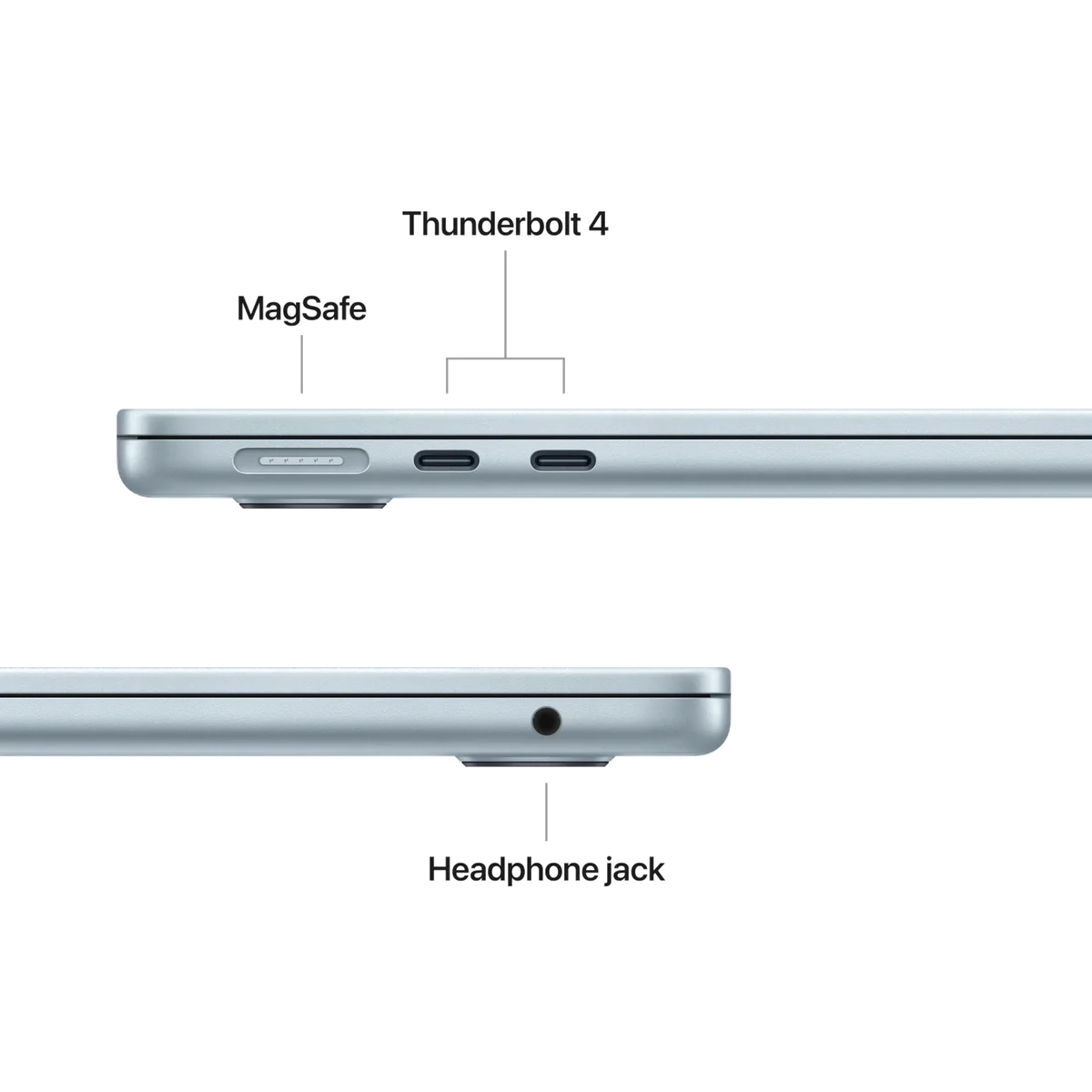
Both Thunderbolt 4 ports sit on the left, joined there by MagSafe charging, while the right edge carries only a headphone jack. Thunderbolt provides fast storage, charging and display output, and this Air can drive two external displays. MagSafe also leaves both data ports free and releases if someone catches the cable.
The arrangement becomes annoying as soon as a desk has cables approaching from the right. There is no USB-A, HDMI, Ethernet or SD slot, so photographers, presenters and wired-network users should budget for a hub. A single USB-C port on the opposite edge would have solved a disproportionate number of desk-layout problems.
Wi-Fi 7 and Bluetooth 6 are sensible future-proofing, not reasons to replace a working laptop. Wi-Fi 7 requires compatible network equipment to show its advantage, although one owner with a suitable router reported throughput close to the limits of a gigabit internet connection from the next room. That is a useful example, not a universal promise.
Strengths & Limitations
Strengths
- The M5 delivers excellent responsiveness and enough headroom for serious mainstream work.
- The 2.7-pound fanless body is exceptionally portable and completely silent.
- Sixteen gigabytes of memory and a 512GB SSD make the base configuration genuinely usable.
- Battery life comfortably covers a normal workday under mainstream workloads.
- The keyboard, Force Touch trackpad, Touch ID, camera and speakers form an unusually polished daily interface.
- MagSafe, two Thunderbolt 4 ports and support for two external displays create a capable compact workstation.
Limitations
- The 60Hz SDR display lacks the contrast, motion clarity and HDR expected from a premium laptop.
- Sustained processor and graphics performance falls as the fanless chassis heats up.
- Both USB-C ports are on the left, and HDMI, USB-A, Ethernet and an SD slot all require adapters.
- Memory and storage are soldered and cannot be upgraded after purchase.
- The exact 512GB base model has fewer GPU cores than many review units used for published benchmarks.
- MacOS software compatibility and the limited AAA game catalogue rule it out for some Windows users.


Fast in the way most people actually need
The M5 makes the Air an outright fast ultraportable. Browsers with many tabs, office suites, research tools, communication apps, photo editing and code work fit comfortably within its remit. Short CPU tasks can approach the fan-cooled base-M5 MacBook Pro, and single-core performance is especially strong, which helps explain why launching apps and moving through ordinary work feels immediate.
CNET’s 16GB/1TB test machine scored 4,148 in Geekbench 6 single-core and 16,890 in multicore, compared with 3,818 and 15,049 for its M4 Air result. Tom’s Hardware recorded 4,168 and 17,067 from another 16GB/1TB model. Those results show the processor’s class, but the tested 10-core GPUs and larger SSDs mean graphics and disk numbers should not be copied onto this 512GB listing.
The improved 512GB starting capacity matters more than another celebratory benchmark. It leaves enough local room for applications, documents and a sensible working library without forcing an immediate storage upgrade. Faster storage also helps large transfers and swap performance. An external SSD can add capacity later, but it cannot compensate for insufficient unified memory.
For mainstream use, 16GB is the correct floor and usually enough. Buyers who routinely combine large Adobe projects, development tools, virtualized environments or local AI models should consider 24GB before purchase. Memory and storage are soldered, so the configuration chosen at checkout is permanent. Our separate guide to choosing 16GB or 24GB of MacBook memory is the better place to resolve that decision.
Silence has a performance ceiling
The Air has no fan. It remains silent during a compile, export or game, which is wonderful in a classroom, bedroom or recording space. The same design cannot hold peak processor and graphics speeds indefinitely. Tom’s Hardware saw its repeated Cinebench score fall from roughly 3,415 into the low 2,300s, a decline of about one third as the system settled under sustained load.
That distinction separates a quick creative laptop from a production workstation. An occasional 4K export, moderate photo edit, Xcode build or Blender session is reasonable. Long video renders, large code compiles, bulk image exports, demanding 3D work and repeated local-AI jobs will finish faster on an actively cooled MacBook Pro. The Air is powerful enough to tempt buyers into workloads its chassis cannot sustain, so the fanless caveat belongs in the buying decision rather than the footnotes.
If your day regularly includes those jobs, compare the Air with the 14-inch MacBook Pro M5 and read our broader MacBook Air versus MacBook Pro guide. The Pro costs weight and silence, but its cooling, XDR display, HDMI and SD card slot solve problems the Air cannot.
The AI hardware is real, but the slogan gets ahead of it
M5 includes a 16-core Neural Engine, neural accelerators in the GPU and higher unified-memory bandwidth. Those changes create genuine headroom for supported on-device AI workloads. One reviewer found local model work around twice as fast as M4 in typical use, rather than the much larger gains possible in carefully suited tasks.
Apple Intelligence features are platform software, not exclusive proof that this is a revolutionary AI computer. The practical case for M5 is that it can process more work locally and has room for applications to use the new accelerators later. Nobody should buy it on the assumption that every writing tool, image generator or chatbot becomes several times faster.
Games are a side activity
The Air can run casual games and selected demanding titles with compromises, and its integrated graphics are considerably stronger than basic-laptop graphics of the recent past. It is still a poor primary gaming purchase. The macOS catalogue excludes many major releases, the 60Hz panel limits the presentation, and sustained graphics loads eventually meet the fanless thermal ceiling.
Buyers interested mainly in AAA games should choose different hardware. Buyers who work on a Mac and occasionally play compatible titles can treat gaming as a useful bonus rather than a defining capability.
The crowded middle is where value gets complicated
The Air used to be the uncomplicated entry point to a Mac laptop. It now sits between a much cheaper basic-use MacBook and the better-equipped Pro. Its premium is justified only when the buyer will use the additional memory, storage, multitasking speed, Thunderbolt bandwidth, dual-display support, colour accuracy, backlit keyboard, Touch ID, MagSafe, camera quality or battery endurance.
The lower-tier MacBook is adequate for web apps, streaming, documents and light schoolwork, but its fixed 8GB memory places a much tighter limit on simultaneous apps and tabs. Wirecutter found that it began to stutter as memory filled and relied aggressively on SSD swap. The M5 Air is the safer long-term choice for anyone who expects coursework, employment or creative interests to become more demanding.
The MacBook Pro occupies the other boundary. It adds sustained performance, a 120Hz mini-LED XDR display, more ports and stronger audio, but it is heavier and unnecessary for routine productivity. The Air earns its place when the cheaper model is too constrained and the Pro’s capabilities would spend most of their life idle.
| Buyer | Best direction | Reason |
|---|---|---|
| Basic browser and document use | Entry MacBook or discounted older Air | The M5 Air’s headroom may go unused. |
| Mobile study and professional work | 13-inch M5 Air | It combines 16GB, strong performance and the lowest practical carrying burden. |
| Large spreadsheets and split-screen work | 15-inch M5 Air | The larger canvas matters more than the small weight saving. |
| Daily long renders or complex media jobs | MacBook Pro | Active cooling and additional ports remove real workflow bottlenecks. |
| AAA gaming or Windows-only software | Compatible Windows laptop | Software fit outweighs the Air’s hardware refinement. |
The 13-inch choice should be made with a bag and a desk in mind, not with the belief that smaller automatically means compromised. Choose it when the laptop travels frequently or works in tight spaces. Choose the 15-inch version when eyesight, side-by-side documents, timelines or larger spreadsheets make screen area part of productivity. Our 13-inch versus 15-inch MacBook Air comparison treats that as a workspace decision rather than a performance contest.
Checkout price still controls the final answer. The Air’s base price increased after launch, while retailer promotions and older M3 or M4 stock can move independently. Specs & Screens would compare the actual totals for a 16GB configuration on the day of purchase rather than assume the newest model is automatically the best value.
Windows switchers should audit software before admiring aluminium. macOS offers excellent standby behaviour, continuity with iPhone, polished trackpad gestures and strong battery efficiency, but it does not run every Windows application or AAA game. Window-management conventions, Android integration and peripheral workflows can also be decisive. For readers unsure whether a touch-first device would fit better, our iPad versus MacBook guide explains why the Mac remains the more complete choice for desktop applications, files and sustained keyboard work.
Battery life without the fairy tale
Apple advertises up to 18 hours, and controlled tests show that number is possible under light, carefully defined conditions. Macworld reached 18 hours and 24 minutes in a downloaded-movie loop, PCMag recorded 18 hours and 4 minutes with local video, CNET streamed YouTube for 17 hours and 2 minutes, Tom’s Hardware logged 15 hours and 28 minutes in a mixed browsing and media test, and Wirecutter reached about 16 hours.
Those figures support an excellent full-workday verdict, not a guarantee of 18 working hours. Pickr’s heavier combination of writing, photo editing, web use, video calling and local AI landed between six and ten hours. Brightness, calls, games, exports and AI processing can consume the difference rapidly.
The included dynamic power adapter can temporarily deliver close to 60W and then reduces power as the battery fills. A suitable higher-output adapter enables Apple’s faster charging target, but most buyers do not need to replace the included unit. MagSafe remains the better everyday charging connection because it preserves both Thunderbolt ports and can detach safely when pulled.
The part that cannot be upgraded deserves the most thought
A 16GB/512GB Air should age well for mainstream productivity, particularly compared with 8GB machines that already lean heavily on storage swap. That does not make it repairable or expandable. The memory and SSD cannot be replaced by the user, and many hardware repairs will lead back to Apple or an authorized service channel.
Storage is the easier limitation to manage because external drives and cloud services exist. Memory is not. A buyer debating more memory against cosmetic upgrades or a small GPU increase should normally protect the memory first, especially for Adobe applications, development environments and local AI.
The one-year limited warranty is ordinary rather than generous. Portable computers face drops, liquid and travel wear, so an extended-care decision should be based on replacement risk and repair tolerance rather than the belief that premium construction makes accidents impossible.
Do not upgrade a healthy M4 just to own an M5
M3 and M4 Air owners already have nearly the same body, display, keyboard, trackpad and port layout. M5 brings faster processing, quicker storage, newer wireless and a better base-capacity floor, but it does not transform the experience. Upgrade only if the existing machine has a specific memory, storage, battery or performance constraint.
Intel owners will experience a far larger leap. M1 and M2 owners are more situational: the M5 is meaningfully quicker and improves several supporting components, yet an M1 that still handles documents, browsing and video calls does not become obsolete because a new chip exists. A discounted M3 or M4 Air with 16GB can also be the smarter purchase when the gap is substantial; our M5 versus M4 MacBook Air comparison lays out what actually changed.
Frequently Asked Questions
Is the 2026 MacBook Air a good everyday laptop?
Yes, its performance, battery life, build, inputs and portability are excellent for mainstream work, although the 60Hz display and limited ports fall behind its premium positioning.
Are 16GB of memory and 512GB of storage enough?
They are enough for most study, office, coding and moderate creative work, while heavier Adobe workflows and local AI make 24GB the safer long-term choice.
Does the MacBook Air really last 18 hours?
It can approach 18 hours in controlled light-use tests, but demanding mixed work involving calls, editing, exports or local AI can reduce endurance substantially.
Will the fanless MacBook Air throttle?
Yes, it loses performance during long processor or graphics loads, even though short tasks remain extremely fast and the chassis stays silent.
Can the M5 MacBook Air run two external monitors?
Yes, it supports up to two external displays through its Thunderbolt 4 connections.
Is the 13-inch model too small for work?
No for most mobile document and browser work, but spreadsheets, timelines, older eyes and frequent split-screen layouts make the 15-inch Air more comfortable.
Should an M4 MacBook Air owner upgrade?
Usually not, because the M5 improves speed, storage and wireless connectivity without changing the body, display, keyboard, trackpad or basic port layout.
Can the memory or SSD be upgraded later?
No, both are soldered, so memory and internal storage capacity must be chosen before purchase.
Is the MacBook Air M5 a gaming laptop?
No, it can play casual and selected demanding Mac games, but the software catalogue, 60Hz display and fanless throttling make it a poor AAA gaming choice.
Is Wi-Fi 7 a reason to upgrade?
No by itself, because it needs compatible network equipment, but it is worthwhile future-proofing for a laptop intended to remain in service for years.
Sources (11)
- Amazon listings and customer reviews — Apple Macbook Air 13
- Owner reports across r/apple threads
- Owner and reviewer video, 2 channels
- Pcmag — Article — www.pcmag.com
- Macworld — Article — www.macworld.com
- Tomshardware — Article — www.tomshardware.com
- Cnet — Article — www.cnet.com
- Avforums — Article — www.avforums.com
- Bgr — Article — www.bgr.com
- Nytimes — Article — www.nytimes.com
- Au — Article — www.pickr.com.au