A Chromebook can replace a laptop, but only if your work already lives in the browser
Buy one if: your routine consists mostly of websites, email, Google Docs, Classroom, forms, streaming and cloud files.
Walk away if: you need a particular Windows or macOS application, demanding creative tools, serious PC gaming, abundant local storage or reliable performance across many active windows.
A Chromebook is a laptop built around ChromeOS. It has the familiar lid, keyboard, trackpad and browser, but the operating system changes what the hardware is for. Instead of treating locally installed desktop software as the center of the computer, it favors web services, Google accounts, cloud storage and a more controlled software environment.
That can be liberating. Open the lid, sign in and the machine can recover bookmarks, passwords and other synced account data with little ceremony. It can also be limiting in a way no processor specification fixes. If a course, employer or hobby requires a conventional desktop program that ChromeOS does not support, the Chromebook is unsuitable even when every other feature looks appealing.
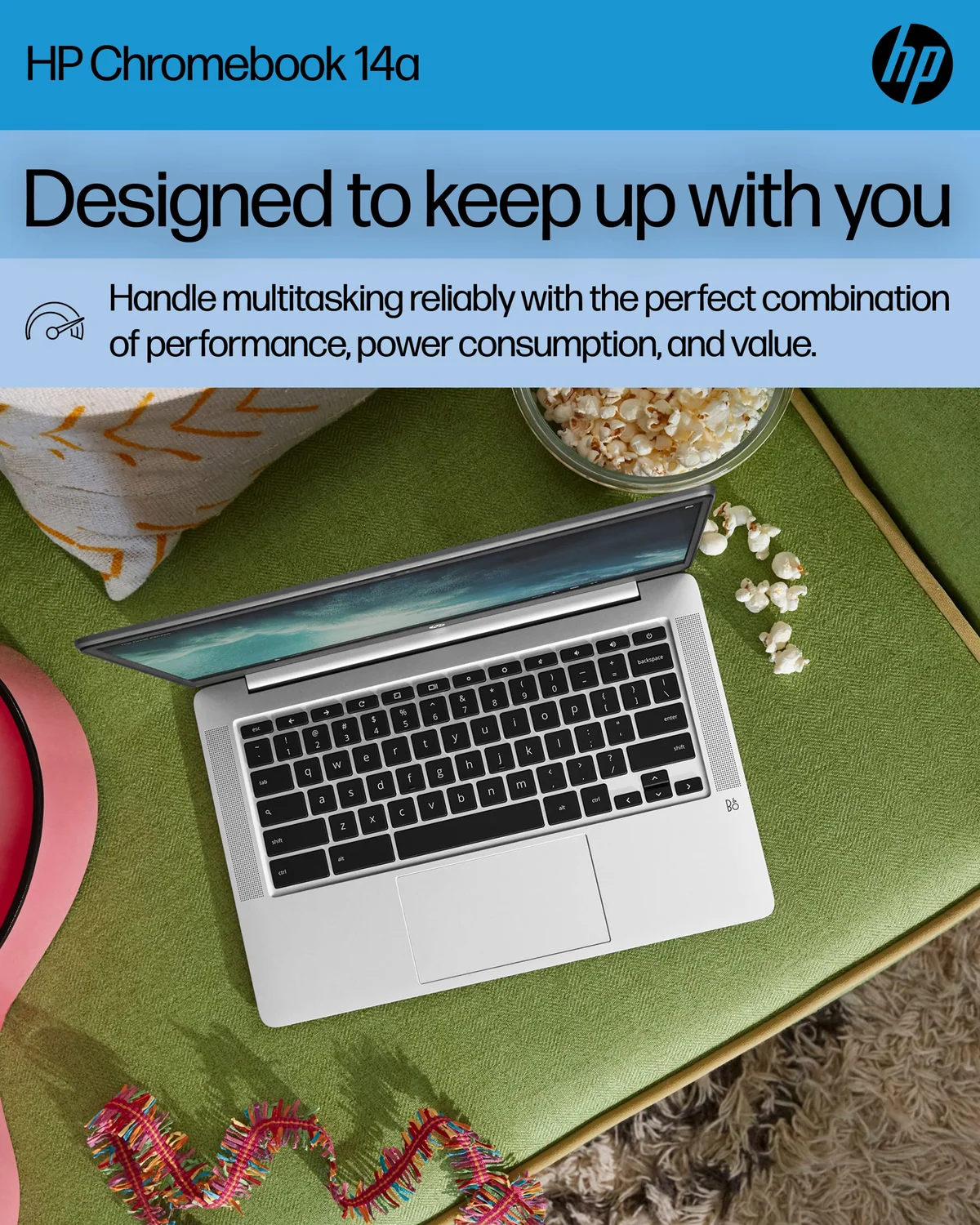
The HP Chromebook 14 N4120 makes the distinction unusually clear. Exact owners used it successfully for children’s homework, classes, vacation browsing and a small business’s emergency browser workflow. One owner restored existing Chrome accounts, connected through a mobile hotspot and resumed work with a printer, mouse and barcode reader. Another later found that multiple open windows caused slowdown and frequent freezing. Both experiences can be true because the machine fits a narrow workflow far better than an expanding one.
The browser is the computer
ChromeOS is at its best when the service matters more than the local application. Gmail, webmail, Google Docs, Drive, Classroom, browser-based accounting, online forms, video services and many workplace portals fit naturally. A physical keyboard makes sustained writing and data entry more comfortable than they would be on a touch-first device, while account synchronization makes a replacement or shared machine easier to restore.
The useful test is not whether an activity sounds like “work.” The test is where that work happens. Writing a report in Google Docs is an easy fit; preparing the same report in a required desktop publishing application may not be. Editing a simple spreadsheet in the browser is ordinary Chromebook work; maintaining a workbook that depends on desktop-only functions, add-ins or automation is a compatibility question that must be settled before purchase.
| Task | Likely fit | What decides it |
|---|---|---|
| Email, browsing and forms | Strong | The work already happens on the web. |
| Google Docs and Classroom | Strong | ChromeOS is designed around Google accounts and browser services. |
| Streaming lessons and video | Generally good | The display, speakers and connection determine the experience. |
| Video calls | Conditional | Camera quality, memory and simultaneous tabs matter. |
| Android apps | Conditional | Availability does not guarantee a good keyboard-and-trackpad interface. |
| Large offline media libraries | Weak on modest storage | Usable local capacity is lower than the number printed on the box. |
| Professional desktop software | Usually poor | The required application must have a suitable web or ChromeOS version. |
| Modern PC gaming, CAD or video editing | Poor on entry-level models | Software support and hardware performance both become obstacles. |
Google Play expands the available software, but it does not turn every Android app into a desktop application. Some mobile apps make sense on a large screen; others retain touch-oriented controls, reduced features or awkward window behavior. “It has the app” and “it can replace the desktop version” are different claims.
ChromeOS becomes too limiting at one non-negotiable requirement
Buyers often compare long lists of capabilities when one hard requirement should decide the purchase. If an exam system, employer, specialist peripheral, game or creative package requires Windows or macOS, stop there. A workaround that depends on remote access, a second computer or an unofficial installation is not equivalent to owning the compatible computer in the first place.
School use illustrates the trap. A Chromebook can be excellent for browser-based homework, Google Classroom, Docs, research and streamed lessons. It is a poor choice for a course that mandates Windows software, local programming tools, CAD or another unsupported application. Families should ask the school for the actual application names rather than accepting the vague assurance that students merely “need a laptop.”
The same rule applies at work. Browser-based scheduling, customer records and communications may run perfectly, as the HP owner who restored a small business workflow demonstrated. A proprietary desktop accounting package or tightly managed company client can make the same Chromebook useless for the next task. Compatibility is binary long before performance becomes a matter of degree.
A tablet may be the better secondary device when reading, touch-first entertainment and casual apps matter more than typing. A conventional laptop remains the safer general-purpose purchase when desktop software is uncertain. The site’s laptop and tablet comparison separates those physical and software tradeoffs, while the student computer and tablet guide covers buyers whose classes demand more than browser access.
Cheap hardware can make a suitable operating system feel unsuitable
ChromeOS has a reputation for running well on modest components, but efficiency is not immunity. Memory still determines how comfortably the machine can keep tabs, calls and applications active. Storage speed still affects local operations. Screen resolution still determines how sharp text looks and how much information fits at once.
The HP 14a-na0226nr uses an Intel Celeron N4120, 4 GB of memory, 64 GB of eMMC storage and a 14-inch 1366 × 768 display. That is enough for a few light tasks performed with discipline. It is not much room for the way people gradually use computers after the first week, when one document becomes a video call, several reference tabs, messages and a downloaded file.
Four gigabytes of memory is the most immediate warning. Exact owner reports range from praise for easy setup and acceptable speed to an account of worsening video performance, freezing and failure to cope with multiple windows. The conflict is useful rather than confusing: a clean, narrow session can feel responsive while a crowded session exposes the hardware ceiling.
The display is not a minor specification. A resolution of 1366 × 768 spread across 14 inches gives documents less usable space and softer text than a Full HD panel. HP’s “4K ready” language refers to the graphics capability, not to the built-in screen, which cannot display 4K detail. The closest independently reviewed member of the same broad 14a family also treated light browsing and video as its proper territory, although its different processor and storage mean its measurements should not be transferred to this exact model.
Storage needs the same skepticism. A 64 GB label does not mean 64 GB is available for personal files, and eMMC is not a roomy SSD. Cloud documents and a modest offline cache fit the design. Large downloads, games and media collections do not. If substantial offline work is part of the plan, include external storage and file management in the decision rather than assuming the cloud-first machine will somehow become local-first later.
The HP Chromebook 14 is evidence for the limit, not an exception to it
The HP’s credible appeal is simplicity. Owners found it easy to set up, straightforward for children and light enough for travel. Google-account recovery and parental controls can reduce household administration, especially when Gmail, Drive and Classroom are already established. Those strengths explain why a modest Chromebook can be more pleasant than a more complicated computer for one tightly defined job.
Its drawbacks are equally concrete. The low-resolution screen affects every page. Four gigabytes of memory restricts multitasking. The 64 GB eMMC drive discourages large local libraries. Gray keyboard legends may be difficult to distinguish, and one exact owner reported a charger failure after seven months. The available evidence also conflicts on the precise number of USB ports, so buyers should inspect the exact unit rather than borrowing a port list from another machine with “HP Chromebook 14” in its name.
Most buyers should skip this particular configuration for general laptop use. It makes sense only as a deeply discounted secondary computer after the intended workload has been reduced to browser tasks, the display compromise has been accepted and the exact automatic-update expiration has been checked. Specs & Screens would not choose it merely because ChromeOS starts quickly or the listing promises all-day performance.
Readers considering that narrow exception can see the complete evidence and model-specific caveats in the HP Chromebook 14 N4120 review. Its honest drawback is not that it lacks one glamorous feature; the entire configuration leaves little margin for a workload to grow.
Account simplicity has a shelf life
A Chromebook’s update window belongs in the buying decision because software support affects security, browser compatibility and long-term usefulness. The exact expiration for the HP 14a-na0226nr is not established in the supplied record, even though the model was released in 2022. Verify it for the precise model identifier before buying, particularly when the computer is expected to last through several school years.
Model precision matters because “HP Chromebook 14” describes many unrelated machines. Different generations use different processors, displays, storage capacities and convertible designs. A favorable review of a newer N100 model, a Chromebook Plus machine or an x360 does not establish how this N4120 configuration performs, just as a family resemblance does not prove an exact port count or panel measurement.
Battery claims should also be treated as ceilings rather than promises. HP advertises up to 14 hours and a charge from empty to 50 percent in approximately 45 minutes, but the supplied evidence does not independently verify either figure on the exact N4120 unit. Screen brightness, wireless use and workload will change the result.
Make the decision in the right order
Software first
Reject ChromeOS immediately if one required application or managed service is incompatible.
Workload second
Estimate the tabs, calls and apps used together, not the single task shown in an advertisement.
Screen and memory third
Prefer a Full HD display and 8 GB of memory when the computer will be used daily or kept for years.
Storage and offline use fourth
Count downloads, media and local files before deciding that a small eMMC drive is enough.
Support life before checkout
Confirm the automatic-update expiration for the exact model rather than the family name.
This order prevents a low purchase cost from deciding the wrong question. A Chromebook can be a calm, effective writing and web machine when the workflow was designed for it. It cannot be made into a compatible Windows or Mac computer by tolerating enough inconvenience.
Frequently Asked Questions
Can a Chromebook replace a normal laptop?
A Chromebook can replace a laptop for browser-based work, Google services, email, streaming and light document tasks, but it cannot safely replace one when required Windows or macOS software determines the job.
Can a Chromebook work without an internet connection?
Some files and supported applications can be used offline when prepared in advance, but small local storage and a cloud-first workflow make a Chromebook less suitable for extensive disconnected work.
Can a Chromebook run Microsoft Office?
A Chromebook can use suitable web-based Microsoft services, but buyers who depend on desktop-only Office features, add-ins or automation should verify those requirements rather than assume the browser version is equivalent.
Can a Chromebook run Android apps?
ChromeOS offers access to Android apps through Google Play on supported devices, although app availability does not guarantee desktop-class features or comfortable keyboard-and-trackpad controls.
Is a Chromebook good for students?
A Chromebook is good for students whose classes use browser tools, Google Classroom and web research, but it is the wrong choice when coursework requires Windows applications, CAD, specialist programming tools or heavy multitasking.
Is 4 GB of memory enough for ChromeOS?
Four gigabytes can handle a few light tasks, but it leaves little margin for video calls, complex sites and multiple active windows, so 8 GB is the safer target for regular use.
Can a Chromebook play games?
A Chromebook can run some browser and Android games, but an entry-level model such as the HP Chromebook 14 N4120 is not a substitute for a computer built for demanding PC titles.
What should I check before buying a used or older Chromebook?
Confirm the exact model, automatic-update expiration, battery condition, screen resolution, memory, storage, ports and compatibility with every required application and peripheral.