Fire tablets come without Google Play, and that changes which apps you can trust
A current Amazon Fire tablet does not ship with the Google Play Store, and Amazon does not officially support it. Fire OS is built from Android, but Amazon replaces Google’s store and services with the Amazon Appstore, Silk browser, Alexa and its own content system. That is not a skin-deep difference. It determines which apps install normally, which survive only as browser tabs and which require a workaround that Amazon never promised to maintain.
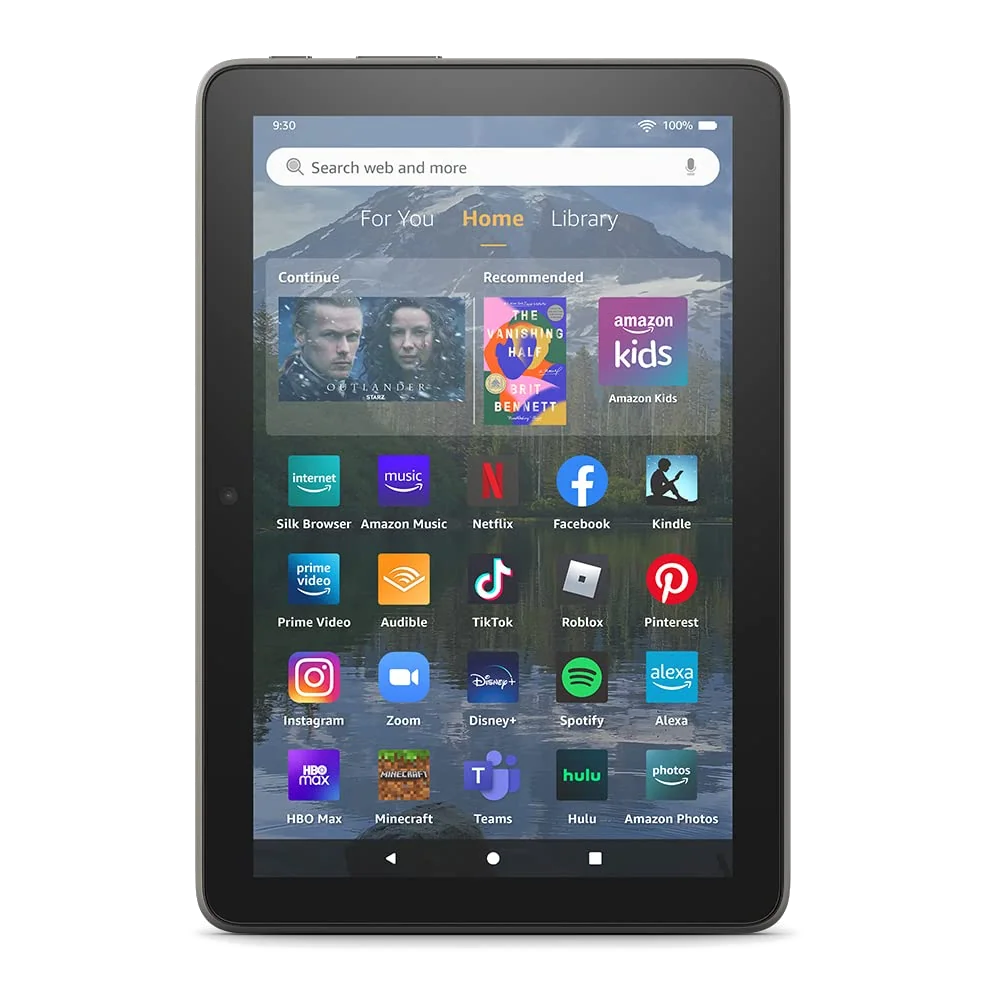
The distinction is easy to miss because Fire tablets can run Netflix, Hulu, Facebook, Instagram, TikTok, Zoom and many other familiar services through Amazon’s store. A buyer can therefore see several recognizable icons and assume the rest of Android is waiting behind them. It is not. Amazon explicitly states that Google Play is unsupported on its Fire HD 8 and Fire HD 10 listings.
A Fire tablet is a sensible buy when
Kindle, Prime Video, Audible, Alexa, supported streaming services, simple games and web browsing cover the intended job. The restriction can even be useful for a young child when the smaller catalog is paired with Amazon’s parental controls.
A regular Android tablet is the safer buy when
Gmail, Chrome, Google Drive, Docs, Meet, Maps, Calendar, Google Home, the native YouTube family or an app distributed only through Google Play belongs on the non-negotiable list. The safest alternative on this site is the Lenovo Tab One, which offers conventional Android rather than asking the owner to repair Fire OS.
The missing store is only the beginning
The Play Store is not merely a place to download games. It also supplies licensing, purchase history, updates and Google Play services used by many Android apps for sign-in, notifications, maps, location and background behavior. Installing an APK does not guarantee that every dependency comes with it, which is why an app can open yet still lose an important function.
Google’s own applications are the clearest casualties. Fire tablets do not provide officially supported native versions of Chrome, Gmail, Google Maps, Google Calendar, Google Drive, Docs, Meet or the Play Store. Silk can open web versions of several services, but a browser page may have fewer offline tools, weaker notifications and a clumsier file workflow than the Android app a buyer expected.
YouTube occupies an awkward middle ground. Video can be watched in Silk, and the Amazon Appstore may present a YouTube entry or web wrapper depending on the date and region, but that should not be mistaken for the standard Google Play installation. The same warning applies more sharply to YouTube Kids, which is absent as an official native app in the supplied Fire Kids evidence.
| What you want | Supported out of the box | Practical reality | Buying implication |
|---|---|---|---|
| Google Play Store | No | It can sometimes be sideloaded with several external installation files, but Amazon does not support the result. | Choose conventional Android if Play Store access is a requirement rather than a hobby. |
| Chrome and Gmail | No official native apps | Web access through Silk is possible, while sideloaded versions may work without becoming fully reliable. | Occasional account access is plausible; a Google-centered daily workflow is a poor fit. |
| Drive, Docs and Meet | No official Google versions | Browser use and some third-party alternatives can cover light tasks, but feature parity and offline behavior should not be assumed. | Do not choose a Fire tablet as a school or work device built around Google Workspace. |
| Maps, Calendar, Home and Keep | No official native apps | Web substitutes vary, and sideloaded applications may install while particular functions fail. | Verify the exact workflow instead of treating successful installation as proof of compatibility. |
| YouTube | Not the standard Google Play experience | Silk can play videos, while the presentation available through Amazon may be a wrapper or browser route. | Fine for casual viewing, but not equivalent for buyers who need every native-app feature. |
| YouTube Kids | No official native app in the supplied Fire Kids evidence | Browser access is not the same controlled experience as the supported application on another platform. | Choose another tablet if YouTube Kids is central to the child’s routine. |
| A specific Android game or utility | Only when Amazon carries a compatible Fire version | Catalog gaps, older versions and missing service dependencies can all matter. | Search Amazon’s current Appstore for the exact title before ordering. |
Amazon’s store is adequate until one missing app owns the decision
The Amazon Appstore covers enough entertainment to make a Fire tablet coherent. The supplied listings and owner records include services such as Netflix, Hulu, Disney+, Facebook, Instagram, TikTok, Zoom, Spotify and Microsoft apps, although the exact selection varies by model, country and time. Kindle, Audible, Prime Video and Alexa naturally receive the strongest integration.
The dangerous phrase is “most of my apps.” A tablet can run nine casual services and still be useless because the tenth is a bank, school, library, smart-home or accessibility app needed every day. One retained Fire HD 10 owner could install OneNote, OneDrive, Zoom, Hulu and Netflix but found that Tidal, which had worked on an earlier Fire, was unavailable on the newer device. App presence is therefore something to verify, not a permanent property of the product family.
Do this app audit before choosing a Fire tablet
- Write down every app whose absence would make you return the tablet.
- Search for the exact app in Amazon’s current Appstore rather than relying on an old compatibility list.
- Confirm that the Fire version supports the feature you need, including downloads, casting, purchases, notifications and child profiles.
- Check whether an acceptable web version works in Silk without requiring unsupported browser extensions.
- If the answer depends on sideloading, price the tablet as a maintenance project rather than a ready-to-use appliance.
This audit matters most for school, work and smart-home use. Microsoft applications have appeared in Amazon’s catalog and can make light document work possible, but that does not restore Google Workspace or transform a modest Fire processor into a productivity machine. If the intended job includes substantial typing, several browser tabs or specialist software, the wider choices in our guide to tablets that can replace a laptop start from a more suitable premise.
Sideloading can rescue a Fire, but it cannot make the rescue official
The familiar workaround involves allowing installation from outside Amazon’s store and loading several Google components in the correct order. It has worked for many owners. Retained reports describe successful installations of Chrome, Gmail, YouTube, Drive, Gboard, banking applications, Microsoft software and games.
Those same reports expose the limit. Google Calendar installed but failed for one owner, YouTube TV lost picture-in-picture behavior, and some third-party applications still had to be installed separately from downloaded APK files. Compatibility can depend on the Fire model, Fire OS release, app version and installation package. An update to any piece can disturb a setup that worked yesterday.
Installing software from outside an official store also moves responsibility onto the owner. The download source must be trusted, the files must match the device and future updates may need attention. Specs & Screens does not treat a successful installation video as a warranty, a security review or proof that every Google-dependent application will behave correctly.
Children’s tablets deserve a firmer boundary. The appeal of a Fire Kids bundle is its managed environment, parental dashboard and curated content. Adding outside stores and packages weakens the simplicity that justified buying it. Parents who already know that a child needs official Google services should begin with the broader options in our children’s-tablet guide.
Which Fire tablet still makes sense?
If every essential app passes the audit, hardware becomes the next decision. The Fire HD 10 is the strongest adult Fire for video and larger-format reading, while the Fire HD 8 is easier to carry. The Kids editions add cases, managed content and replacement coverage rather than a wider app ecosystem. None acquires Google Play merely by being larger, newer, equipped with more memory or labeled for children.
Parents face a cleaner choice. The Fire HD 8 Kids is easier for a preschooler to carry, while the Fire HD 10 Kids gives video, comics and picture books more room. Both are sold around Amazon Kids+, parental controls, a protective case and a two-year replacement promise, and both remain confined to Fire OS. Our direct Fire HD 8 Kids versus Fire HD 10 Kids comparison settles the size question after the app question has been answered.
The older Plus and Like-New models need stronger reasons
The 2022 Fire HD 8 Plus has one distinctive trick: Qi wireless charging can keep it docked and ready for Alexa, recipes, video or reading. Its 3GB of memory also gives it more breathing room than the standard 2022 Fire HD 8. Age now works against it, however, and neither the Plus name nor wireless charging fixes its low-resolution screen, dated performance or restricted store. The newer model comparison in our Fire HD 8 Plus versus Fire HD 8 guide is worth reading before buying old hardware for one unusual feature.
The Like-New Fire HD 10 is a refurbished version of the 2023 hardware with 3GB of memory and 32GB of storage. Amazon says it is tested, certified to look and work like new and covered by the same limited warranty as a new device, but the condition category does not improve the software. It still lacks Google Play, and the 3GB configuration offers less multitasking headroom than the 4GB Fire HD 10 listing supplied for this page.
The restriction is either harmless or decisive
Fire tablets are not broken Android tablets. They are functioning Amazon tablets with a narrower bargain: familiar entertainment, low-stress hardware and strong Amazon integration in exchange for a controlled store and a commercial home screen. That trade works when the intended use already fits Amazon’s boundaries.
It fails when the buyer starts with a list of Google services and plans to negotiate with the operating system afterward. No amount of storage, screen size, parental protection or wireless charging changes that. Buy a Fire because its supported experience is sufficient; if the purchase requires Google Play to become acceptable, walk away before the workaround becomes your first app.
Frequently Asked Questions
Does a Fire tablet include the Google Play Store?
No, current Fire tablets use Amazon’s Appstore and do not officially support Google Play.
Can Google Play be installed on a Fire tablet?
It can often be sideloaded with several external packages, but the process is unsupported, version-dependent and unable to guarantee that every app feature will work.
Can a Fire tablet run Gmail and Chrome?
Fire OS does not include official native Gmail or Chrome apps, although web access and unsupported sideloaded installations may cover some needs.
Can YouTube be watched on a Fire tablet?
Yes, YouTube video can be watched through the Silk browser, but buyers should not assume the complete supported Google Play app experience.
Does a Fire Kids tablet have YouTube Kids?
No official native YouTube Kids app appears in the supplied Fire Kids evidence, so families that require it should choose another platform.
Do Netflix and Disney+ work on Fire tablets?
Supported versions have been available through Amazon’s Appstore, but buyers should verify the exact service, region and required features before ordering.
Are Microsoft apps available on Fire tablets?
Microsoft services including OneNote, OneDrive and Microsoft 365 have appeared in the supplied evidence, although availability and functionality can change.
Will a sideloaded Play Store update apps automatically?
It may update compatible apps after a successful installation, but Amazon does not guarantee that the store, its dependencies or every installed app will remain functional.
Is a Fire tablet suitable for schoolwork?
It can handle light reading, browsing and supported Microsoft tools, but students who depend on Google Classroom, Drive, Docs or Meet should choose conventional Android, ChromeOS or an iPad.
Does paying to remove lock-screen ads make Fire OS look like normal Android?
No, removing lock-screen offers does not remove Amazon’s Appstore, content recommendations, preinstalled services or Google app restrictions.
Is the Fire HD 10 less restricted than the Fire HD 8?
No, the Fire HD 10 provides a larger and sharper screen but uses the same Amazon-first software model without official Google Play support.
What should I check before buying a Fire tablet?
Verify every essential app and feature in Amazon’s current Appstore, then buy only if the supported out-of-box experience is sufficient without sideloading.